| Metric | Value |
|---|---|
| Format | web app in the browser |
| Android | Chrome → Add to Home screen |
| iOS | Safari → Add to Home Screen |
| Sports XP on mobile | 3 XP per $1 |
| Sign-in options | email, Google, Line, Telegram |
| Live chat | 24/7 in the browser |
The web app in the mobile browser
The home page and the sports page describe the platform as browser-based and fully responsive, with no download before play, and invite the user to save the site as a web app on the home screen. The shortcut opens the same site, with the same account and balance as on desktop.
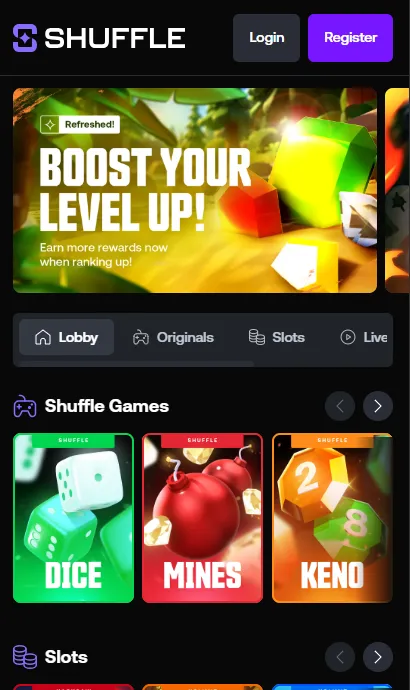
- works in Chrome on Android and in Safari on iOS;
- nothing to reinstall: the site updates itself;
- the same username, password, 2FA and Vault as on desktop.
Access depends on the law of the user’s state and country; the guide’s chapter on the legal status in India covers the Online Gaming Act 2025. The web app is available only to users of 18 and older.
The Shuffle India guide opens with an overview of the catalogue, the cashier, the rewards and the law; this page goes into one part of it in detail.
Adding the web app on Android
Chrome on Android offers the shortcut from its menu. The steps below use the menu names shown in Chrome; other Android browsers have a similar item under a different name.
- Open the casino’s home page in Chrome and log in.
- Press the menu button (⋮) in the top right corner.
- Press Add to Home screen.
- Confirm with Install or Add, depending on the Chrome version.
The icon appears on the home screen. The account and the balance stay untouched, because nothing is stored in the shortcut itself.
Adding the web app on iOS
Safari on iPhone and iPad adds a site to the home screen through the Share sheet. The steps below use the menu names shown in Safari.
- Open the casino’s home page in Safari and log in.
- Press the Share button at the bottom of the screen.
- Scroll the sheet and press Add to Home Screen.
- Check the name and press Add.
Promotions and redeem codes are announced in the Telegram channels listed under redeem codes; the shortcut itself sends nothing.
What works in the mobile browser
The mobile version is the same site as on desktop, so every section is reachable. The list below names the sections that matter most on a phone.
- casino: 4,491 games from 47 providers, with demo mode on most slots;
- Originals: 17 provably fair in-house games;
- live casino: 84 tables, including Crazy Time and Super Andar Bahar;
- sports and esports: live betting, cash out and same-game multi;
- wallet: deposits, withdrawals, the Vault and the Buy Crypto option;
- chat: tips, rains and the weekly race leaderboard;
- Shuffle Wise: wager and loss limits, self-exclusion from 1 day to permanent.
Live streams for sports events and the provably fair verification page at shuffle.com/provably-fair/verify open in the mobile browser too.
What the install takes
The shortcut has no separate installer, so the requirements are those of a current mobile browser. The operator does not publish minimum OS versions.
| Item | Requirement |
|---|---|
| Browser | A current version of Chrome on Android or Safari on iOS |
| Operating system | An Android or iOS version supported by that browser |
| Storage | Only the shortcut and the browser cache; no separate package |
| Connection | A stable mobile or Wi-Fi connection; live tables and streams use more data than slots |
| Account | The same account as on desktop; 2FA codes come from the authenticator app on the phone |
Sports on mobile and the 3× XP rule
VIP progress does not depend on the device. The casino credits 1 XP per $1 wagered in casino games and 3 XP per $1 on sports bets with odds of 1.1 or higher, on mobile and on desktop alike. The minimum sports bet is $0.50.
- 3 XP per $1 on sports at odds of 1.1 or higher;
- 1 XP per $1 in slots, live tables and Originals;
- ranks from Wood (500 XP) to Legend (10,000,000,000 XP), detailed in the chapter on the VIP program.
Cricket, football, tennis and more than 20 esports titles are listed in the chapter on sports betting. A new user starts with registration in the browser; the home-screen shortcut is added afterwards.
The web app opens from the home screen with the same account, wallet and chat as on desktop.
Frequently asked questions
Short answers on mobile access and the home-screen shortcut.
Is there a download before using Shuffle on a phone?
No download comes before play: the site runs in the mobile browser and can be saved on the home screen as a web app from Chrome on Android or Safari on iOS.
How is the web app added on Android?
Open the casino’s home page in Chrome, press the menu (⋮), choose Add to Home screen and confirm with Install or Add.
How is the web app added on iPhone?
Open the casino’s home page in Safari, press Share, choose Add to Home Screen and press Add.
Does the home-screen shortcut change the account or the balance?
No. The shortcut opens the same site; the account, the wallet and the chat are identical to the desktop version.
Do sports bets on mobile earn the same XP?
Yes: 3 XP per $1 on sports bets with odds of 1.1 or higher and 1 XP per $1 in the casino, on any device.